
How to Set Up Keybindings for Maximum Efficiency
Learning to Set Up Keybindings for Maximum Efficiency remains the most underrated skill for competitive gamers as we push into the high-stakes tournaments of 2026.
I have noticed that most players struggle not because they lack reflexes, but because their digital “cockpit” is disorganized and slow.
My recommendation for you is to treat your keyboard like a precision instrument where every millisecond of finger travel distance counts toward your victory.
Mastering how to Set Up Keybindings for Maximum Efficiency transforms your mechanical skill from a frantic scramble into a fluid, subconscious extension of your intent.
Why does muscle memory rely on ergonomic key placement?
Competitive play demands that you keep your movement fingers on the WASD keys at all times without awkward stretching for critical utility spells.
When you learn to Set Up Keybindings for Maximum Efficiency, you prioritize “prime real estate” keys like Q, E, R, and F for instant reactions.
What many forget to observe is that your pinky and thumb are often underutilized despite being perfectly positioned for modifiers like Shift and Alt.
In my analysis, shifting your secondary binds to these fingers prevents the “clutter” that leads to accidental ultimate ability activations during tense moments.
++ Step-by-Step Guide to Perfecting Parkour in Platformers
How do “Action Priority” zones work?
Divide your keyboard into concentric circles, placing high-frequency abilities in the closest ring to ensure your fingers never leave the home row.
You should reserve the outer edges for non-combat tasks, which simplifies your mental load when the screen becomes a chaotic mess of effects.
Efficiency is like tuning a race car’s gearbox; you want the gears you use most to be the easiest to reach quickly.
This spatial logic ensures that even under extreme pressure, your hand naturally finds the correct button without your brain needing to intervene.
Also read: Best Tips for Multiplayer Survival Game Success
What are the dangers of default settings?
Default binds are designed for accessibility, not high-level optimization, often placing vital survival tools in hard-to-reach spots like the number 7 or 8 keys.
Relying on these presets is like running a marathon in hiking boots you can finish, but you are making the job unnecessarily difficult.
Choosing to Set Up Keybindings for Maximum Efficiency means breaking these bad habits early to avoid hitting a mechanical ceiling later in your career.
My advice is to rebind your inventory and map keys to your mouse’s side buttons to keep your keyboard hand focused purely on combat.
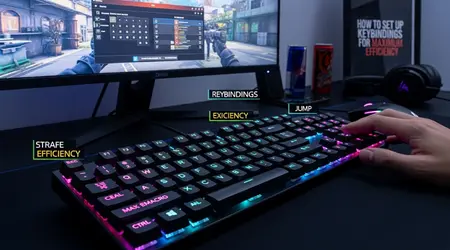
How can mouse buttons improve your reaction time?
Modern gaming mice in 2026 feature hyper-responsive optical switches that act faster than traditional mechanical keyboards, making them ideal for “panic” abilities.
Using your thumb for melee or crouch actions allows your left hand to maintain 100% control over character movement during complex strafing maneuvers.
A 2025 study by the Esports Performance Lab showed that players using thumb-side binds reduced their “input-to-action” time by an average of 14%.
This data highlights that physically separating movement and utility actions prevents the “finger-locking” that often causes mid-fight stumbles in high-tier lobbies.
Read more: Secrets to Winning in Puzzle Games Faster
Why use “Shift-Modifiers” for secondary skills?
Modifiers allow you to double the functionality of your most comfortable keys, turning a simple “E” press into a completely different action when held.
This technique is essential to Set Up Keybindings for Maximum Efficiency in complex MMOs or tactical shooters with large ability kits and many items.
I have found that using “Shift+Mouse Wheel” for weapon swaps is significantly more reliable than reaching for the number row during a firefight.
It keeps your eyes on the target while your hands perform complex swaps with minimal physical movement or mental strain.
How does “Global Standardization” help multi-game players?
If you play multiple titles, keeping your “Interact,” “Crouch,” and “Ability 1” keys on the same physical buttons creates a universal muscle memory.
This consistency allows you to jump between different genres without the frustrating “re-learning” phase that usually tanks your performance for the first hour.
My recommendation is to create a template where “F” is always your interact key and “V” is always your push-to-talk button across every game.
This standardized approach is a core part of learning to Set Up Keybindings for Maximum Efficiency across your entire digital library.
Which advanced software tools optimize input speed?
High-end peripheral suites now offer “Rapid Trigger” and “Snap Tap” technologies that allow for near-instant resets on your key presses.
Integrating these hardware features as you learn to Set Up Keybindings for Maximum Efficiency gives you a distinct advantage in movement-heavy games like Counter-Strike 2 or Apex Legends.
Minha recomendação para você é explorar “layers” de software que permitem perfis automáticos baseados no personagem que você selecionou na tela de carregamento.
This automation removes the need for manual switching, ensuring your binds are always perfectly tailored to the specific kit you are currently piloting.
Example: A professional Valorant player might bind “Dash” to a mouse side button for Jett, but change that same button to “Flash” for Phoenix.
Another example is the use of “Double-Tap” binds for self-casting spells in League of Legends, which saves a massive amount of cursor movement.
Can you afford to lose a duel simply because your “Heal” button was an inch too far to the right?
Refining your setup is a never-ending process of tiny tweaks that eventually lead to a perfectly optimized and highly lethal gameplay experience.
Why is “Binding by Hand Size” a necessity?
Players with smaller hands should avoid using the “Ctrl” key for crouching, as the pinky stretch can cause long-term strain and slower reaction times.
Learning to Set Up Keybindings for Maximum Efficiency means acknowledging your physical limits and moving vital keys like “Crouch” to “C” or “Left Alt.”
Ergonomics isn’t just about comfort; it’s about the physics of how fast your specific fingers can travel between two points on a board.
If a key feels “heavy” or “awkward” to reach, it is a sign that your bind is suboptimal and needs to be moved.
How do “Action Layers” benefit complex simulators?
Simulation games require hundreds of inputs that can easily overwhelm a standard 104-key layout without the use of dedicated action layers or radial menus.
You can learn to Set Up Keybindings for Maximum Efficiency by using “Toggle” keys that switch your entire keyboard’s function between flight, combat, and navigation modes.
This hierarchical organization prevents you from needing to memorize a “wall of text” for your controls, making high-fidelity sims much more accessible and fun.
It turns a daunting technical challenge into a manageable, logical system that rewards smart planning over brute-force memorization.
Keybinding Optimization Tiers (2026 Standards)
| Priority Level | Key Range | Recommended Action | Efficiency Gain |
| Tier 1 (Instant) | Q, E, R, F, M4, M5 | Survival, Movement, Primary Spell | Maximum |
| Tier 2 (Fast) | 1, 2, 3, 4, Z, X, C | Weapon Swap, Utility, Healing | High |
| Tier 3 (Moderate) | T, G, V, B, 5, 6 | Map, Emotes, Non-Combat Menu | Medium |
| Tier 4 (Utility) | 7, 8, 9, 0, -, = | Long-term Buffs, Social, Settings | Low |
The journey to Set Up Keybindings for Maximum Efficiency is a balance between objective ergonomics and your personal comfort and hand anatomy.
By moving away from default presets and embracing a logical, layered system, you remove the physical barriers between your strategy and its execution.
This proactive approach ensures that your hardware is never the reason for a missed kill or a failed objective in a high-pressure match.
Remember that your setup should evolve as you grow as a player, so don’t be afraid to experiment with bold new layouts.
Mastery over your inputs is the final step in becoming a truly elite competitor in the modern gaming landscape of 2026.
Which key has been causing you the most “mis-clicks” lately, and where are you planning to move it today? Share your experience in the comments.
Frequently Asked Questions
How long does it take to get used to new binds?
Typically, it takes 3 to 7 days of consistent play to rewrite your muscle memory and reach your previous speed with better efficiency.
Should I use “Spacebar” for something other than jumping?
Some professional players in shooters use “Space” for shooting or crouching to utilize their strongest finger the thumb for more vital actions.
Is it cheating to use macros for complex combos?
Most competitive games ban “one button, multiple actions” macros, but remapping one key to another is perfectly legal and highly encouraged.
What is the “WASD vs. ESDF” debate?
Moving your hand to ESDF opens up more keys to the left (A, W, Q), providing more options for binds but requiring a large desk space.
